
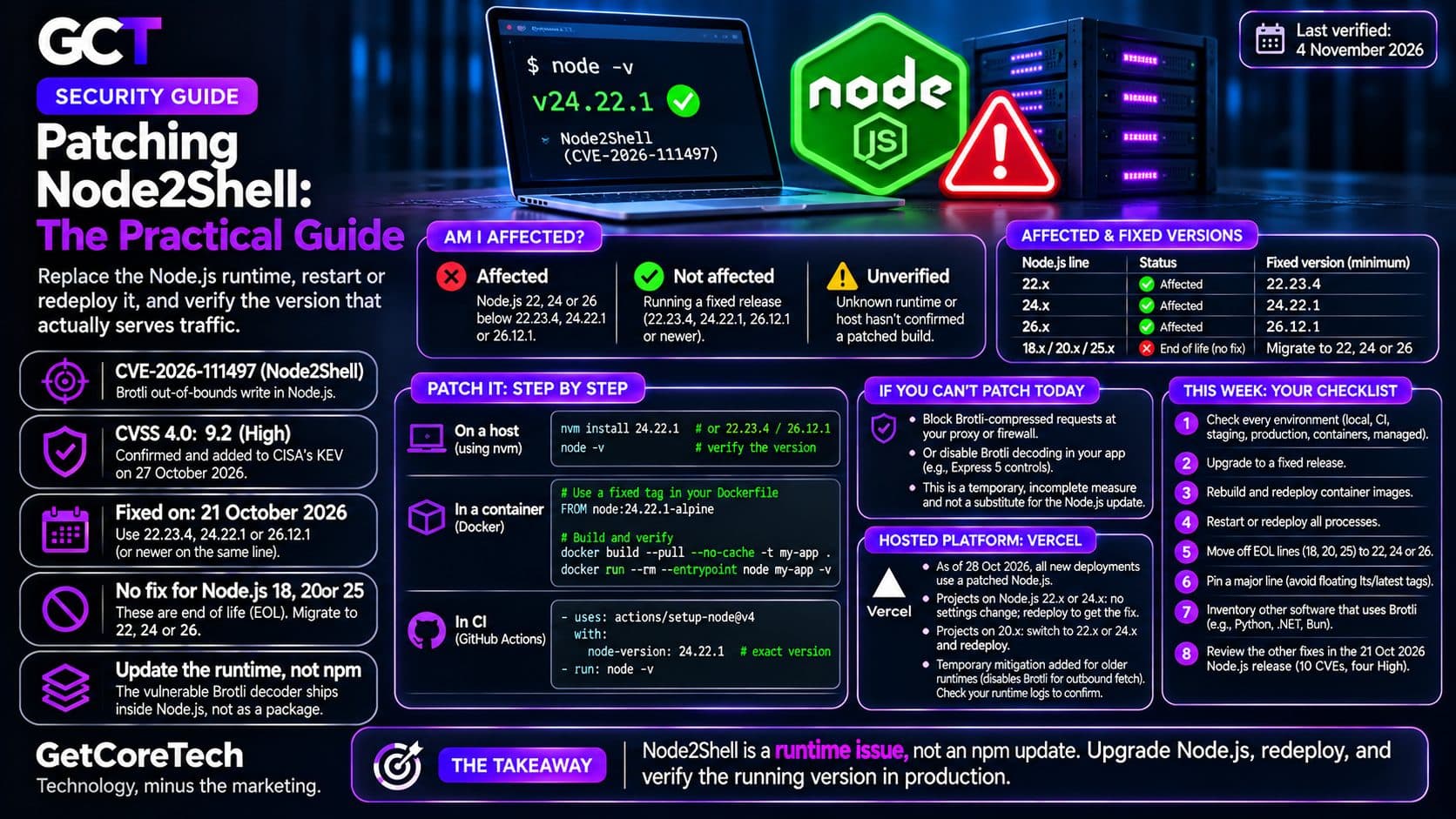
Patching Node2Shell means replacing the Node.js runtime, not an npm package, because the Brotli decoder at fault ships inside Node.js itself.1 Upgrade to 22.23.4, 24.22.1 or 26.12.1, or a newer release on the same line, restart or redeploy every process, then confirm the version in the environment that serves traffic, not on your laptop. The complete PHP2Shell and Node2Shell guide covers both flaw families. This page covers only the Node.js side.
You're affected if: you run Node.js 22, 24 or 26 below 22.23.4, 24.22.1 or 26.12.1.1 The fixed releases shipped on 21 October 2026. CVE-2026-111497 is an out-of-bounds write in the Brotli decoder. Node.js rates it High, and the NVD record scores it 9.2 on CVSS 4.0.12 CISA added it to the Known Exploited Vulnerabilities catalog on 27 October, and the federal remediation deadline is 10 November.34 CISA gave no attack detail. Two honeypot operators reported attempts, and one request matched public proof-of-concept code but produced no shell in that operator's 50 lab tests.5 You're not if: the process serving traffic runs a fixed release or newer. Status as of 4 November 2026.
Node's release schedule lists 18, 20 and 25 as end of life, so none of them will receive this fix. Migrate them to 22, 24 or 26.6 Node's advisory names 22, 24 and 26 as the affected lines.1 Whether an unsupported runtime is exploitable depends on the vulnerable code path and on whether your application decodes attacker-controlled Brotli data. I could not test those lines, so treat them as unpatched, not as proven exploitable. See what to do on Node 18, 20 or 25.
How you'd notice
You wouldn't from outside, so check versions. Node.js does not decode Brotli on its own. Per Vercel, you are exposed when your code or a library decompresses Brotli data an attacker controls, in a request body or in a response your server fetches.7 Tanium notes that Express 5 services decode Brotli request bodies by default.8 Don't read that as a reason to wait: the exposure depends on your dependencies, and the upgrade is cheap.
node -v reports only the Node.js on your PATH. For containers, check two different things.
First, check the image you built. Override the entrypoint so the image's start script doesn't run instead of Node:
docker run --rm --entrypoint node my-app -vSecond, check the container that is actually serving production. An image check says nothing about what is deployed. Run docker exec <container> node -v against the live container, or kubectl exec <pod> -- node -v on Kubernetes. That reports the Node executable found on the container's PATH, which is normally the one the application runs but not guaranteed, for example if a start script calls a different path. The process.version your application logs at startup is the authoritative check.
Bundled runtimes need their own update. A copy of Node.js or Bun shipped inside another application is not fixed by upgrading the system Node, and Tanium says Brotli is compiled into runtimes, desktop apps, proxies and container images that inventories rarely list.8 Per Tanium, a patched Node.js can still report an older Brotli version, so don't treat a Brotli version string as proof either way. Use the Node.js version. For other software, see other software that uses Brotli and whether your web server is affected.
Do this
Do today
- Check every environment: local, CI, staging, production, containers, serverless and hosted platforms.
- Upgrade Node.js on each host to a fixed release.
- Rebuild and redeploy container images, as described below.
- Update Node.js in CI separately from production, as described below.
- Restart or redeploy every process, then verify the one that is running.
On a host, nvm installs a fixed release:
nvm install 24.22.1   # or 22.23.4 / 26.12.1
node -v
Node's schedule already lists 24.22.2 and 26.13.0 as the newest releases on those lines, so a newer patch is fine.6 This fixes the machine you ran it on. It does not touch a server, container or managed runtime deployed separately.
Containers
Pin an exact fixed patch in the Dockerfile. A pinned tag stays on its old release until you edit it to a fixed one:
FROM node:24.22.1-alpineConfirm the tag exists before you rely on it. The official image's README says Debian-based images may be published ahead of Alpine ones for Node.js security releases, because Alpine needs a musl build that may not be ready on release day.9
Build with --pull. Docker documents it as always attempting to pull all referenced images.10 That refreshes the base image. It does not invalidate every cached layer. If an intermediate layer downloads or installs a separate Node.js runtime, such as with curl, nvm or a package manager, that layer can survive a pull. Add --no-cache, or change that layer:
docker build --pull --no-cache -t my-app .
docker run --rm --entrypoint node my-app -v
Then redeploy and check the running container, not only the image.
CI
Updating Node.js in CI patches the CI job. A newer runner does not patch a server, container or managed runtime that you deploy separately. Request the exact fixed version. With an exact version, check-latest: true is not needed:
steps:
  - uses: actions/setup-node@v4
    with:
      node-version: 24.22.1
  - run: node -v
check-latest matters when you request a range such as 24. Without it, the action resolves a version from the runner's local cache first, and that cache updates with a lag.11
If you can't patch today
Per BleepingComputer's summary of CISA's advice, block incoming Brotli-compressed requests at the proxy or firewall, or disable Brotli decoding, until you can update.12 Rejecting requests with Content-Encoding: br reduces exposure through inbound compressed bodies. It is an interim, incomplete measure. It does not cover responses your application fetches from servers it doesn't control, per Vercel, or any other path where your code or a library decompresses Brotli data.7 It is not a substitute for the Node.js update. The application-level mitigation page covers the Express options.
Do this week
- Move off any end-of-life line to 22 or 24, or to 26 once it passes your tests. The schedule lists 26 as LTS.6
- Pin a major line rather than floating on a lts or latest tag, so a rebuild can't jump you to a new major without a test.
- Check Docker base images and CI caches for stale layers, using the
--no-cachepoint above. - Inventory the other Brotli users on your hosts and images.
- Read the other fixes in the same release. The 21 October release fixes ten issues, four rated High.1
Can wait
- Dependency bumps unrelated to this fix, and reformatting your Dockerfiles.
Hosted platforms
Vercel's bulletin says that as of 28 October at 11am PT, all new deployments on Vercel use a patched Node.js.7 Projects on Node.js 22.x or 24.x need no settings change, because Vercel manages patch versions for those runtimes, but existing projects need a redeploy to pick up the patched runtime. Projects on 20.x must switch to 22.x or 24.x and redeploy.7 Vercel also added a temporary mitigation to older managed runtimes that disables Brotli handling for outbound fetch() and node:http requests, which takes effect on redeploy.7 Check the version in your own runtime logs. Don't apply Vercel's statement to other platforms.
If you were exposed
Tanium's lab found that a successful exploit replaced the Node.js process rather than starting a shell, and that failed attempts crash the service, so a crash-and-restart loop can be a sign of attempts.8 The guide to what to do if you were hacked covers what to inspect.

Comments